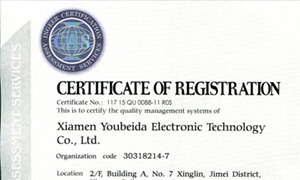




Ubeida got the ISO9001 certificated
In 2015, we got the ISO9001:2008 certificated.We have strict quality management system, which will help us improve the product quality and perfect the production management.
In professional and industrial settings, choosing the right connection cable is crucial for efficiency and reliability. Two widely used options are Quick Disconnect (QD) cables and Universal Serial Bus (USB) cables, each serving distinct purposes. Below, we compare their features, advantages, and ideal use cases.
Quick Disconnect (QD) Cables
Design & Functionality:
QD cables feature a locking mechanism for secure, tool-free connections. They are commonly used in industrial automation, audio/video equipment, and power systems.
Advantages:
Robust & Durable: Built to withstand harsh environments (dust, moisture, vibrations).
Secure Connection: Locking mechanism prevents accidental disconnections.
High Current/Voltage Handling: Suitable for power transmission in machinery.
Seamless mobility: Ideal for call center agents and office workers who need to move around without removing their headset
Limitations:
Larger Size: Bulkier than USB, less ideal for portable devices.
Limited Data Transfer: Primarily used for power, not high-speed data.
QD Cable Usage Environment:
Call centers with multiple workstations.
Offices where employees need to move around constantly without interrupting calls.
Companies with landline telephone systems compatible with QD.
USB Cables
Design & Functionality:
USB cables are standardized for data transfer and power delivery in consumer electronics, computers, and peripherals. Common versions include USB-A, USB-C, and micro-USB.
Advantages:
Versatile Data Transfer: Supports high-speed data (e.g., USB 3.2 offers up to 20 Gbps).
Compact & Portable: Slim design suits mobile devices.
Plug-and-Play: Universally compatible with most modern devices.
Limitations:
Less Rugged: Not designed for extreme industrial conditions.
Lower Power Capacity: Limited compared to QD cables for heavy machinery.
Choosing the Right Cable
Offices with frequent meetings on digital platforms.
Remote work and videoconferencing.
Call centers with VoIP systems.
For Industrial Use: QD cables excel in durability and secure power connections.
For Office/Consumer Tech: USB cables provide faster data transfer and convenience.
Key Differences Between QD and USB
|
Cable Type |
Best for |
Advantages |
|
QD (Quick Disconnect) |
Call centers and offices with landline telephones |
Uninterrupted calls and multi-device compatibility. |
|
USB |
Remote work, Video conferencing, and VoIP |
HD digital sound, compatibility with communication software, integrated controls. |
If you work in a call center with traditional phones, a headset with a QD connection, such as the C10DP, 200DP or NT002P, will be the best option. For remote work and digital meetings, a model with USB connectivity, such as the UB805DM ,NT002M-ENC with USB cable or the UB815DM ,C25DM with USB cable, will ensure smooth, interference-free communication.
QD and USB cables cater to different needs—QD for rugged, high-power applications and USB for portable, high-speed data transfer. Understanding their strengths ensures optimal performance in professional environments.